Connect with us

Hi, what are you looking for?

SecurityWeekSecurityWeek

Malware & Threats

Twitter Enables Option for HTTPS by Default

Twitter Enables Option for HTTPS by Default

Following a trend in allowing users to automatically utilize the secure HTTPS protocol when accessing Web based services, Twitter announced this week that it has added the option for users to force HTTPS connections by default when accessing Twitter.com.

Twitter Enables Option for HTTPS by Default

Following a trend in allowing users to automatically utilize the secure HTTPS protocol when accessing Web based services, Twitter announced this week that it has added the option for users to force HTTPS connections by default when accessing Twitter.com.

The ability to use HTTPS to access Twitter.Com isn’t new, as users have been able to use the social media service via HTTPS by going to https://twitter.com. The new option goes one step further and enables users to automatically make use of HTTPS, without having to remember manually add the “S” in their Web browser.

The reasons to utilize HTTPS when accessing any personal accounts aren’t new, but an easy to use extension for FireFox called “FireSheep,” released in October 2010 spiked concern, as it enables HTTP session hijacking for the masses. Firesheep essentially enabled the average Joe to instantly hack into common services such as Facebook, Twitter, Hotmail and many more sites with ease, when users were logged in over an unsecured Wifi connection. The extension makes something that was already possible, but typically harder to do, incredibly easy. Gmail now users HTTPS by default, and Facebook as recently added the option to enable HTTPS by default. Twitter now joins the default HTTPS party.

Instructions from Twitter on How to Set HTTPS for Twitter.Com:

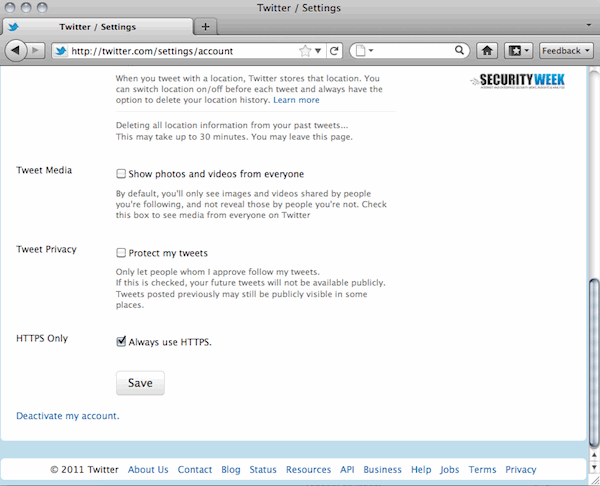
To turn on HTTPS, go to your settings and check the box next to “Always use HTTPS,” which is at the bottom of the page. This will improve the security of your account and better protect your information if you’re using Twitter over an unsecured Internet connection, like a public WiFi network, where someone may be able to eavesdrop on your site activity.
Advertisement. Scroll to continue reading.

How to Set Twitter HTTPS

Twitter notes that when accessing Twitter from a mobile browser, users need to go to https://mobile.twitter.com to use the secure protocol, but they plan to also set mobile access to use the HTTPS connections soon.


Written By

For more than 15 years, Mike Lennon has been closely monitoring the threat landscape and analyzing trends in the National Security and enterprise cybersecurity space. In his role at SecurityWeek, he oversees the editorial direction of the publication and is founder and director of several leading cybersecurity industry conferences around the world.

Click to comment

Trending

Daily Briefing Newsletter

Subscribe to the SecurityWeek Email Briefing to stay informed on the latest threats, trends, and technology, along with insightful columns from industry experts.

In cyber-physical systems (CPS), just one hour of downtime can outweigh an entire annual security budget. Learn how to master the Return on Security Investment (ROSI) to align security goals with the bottom-line priorities.

Register

Delve into big-picture strategies to reduce attack surfaces, improve patch management, conduct post-incident forensics, and tools and tricks needed in a modern organization.

Register

People on the Move

Malwarebytes has named Chung Ip as Chief Financial Officer.

Semperis has appointed John Podboy as Chief Information Security Officer.

Randy Menon has become Chief Product and Marketing Officer at One Identity.

More People On The Move

Expert Insights

Daily Briefing Newsletter

Subscribe to the SecurityWeek Email Briefing to stay informed on the latest cybersecurity news, threats, and expert insights. Unsubscribe at any time.